WordPress Emphasis Plugin: Highlight and Permalink Text

1 min read

Summary: One-click implementation of the New York Times open source emphasis script as a WordPress plugin which allows for highlighting and permalinking of text on a paragraph and sentence level.

Heads up! This post is archived and here for historical purposes. It may no longer be accurate or reflect my views. Proceed at your own risk.
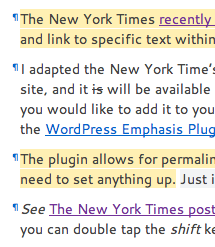
Screenshot of the plugin in use

The New York Times recently open-sourced their nifty wizardry which allows users to highlight and link to specific text within an article or post. In their own words:

Emphasis provides dynamic paragraph-specific anchor links and the ability to highlight text in a document, all of which is made available in the URL hash so it can be emailed, bookmarked, or shared.

I adapted the New York Time’s implementation into a three-line WordPress plugin for my own site, and it is available in the WordPress plugin repository as a one-click install, to add it to your own.

The “deep links” plugin allows for permalinking and highlighting of text on a paragraph and sentence level. No need to set anything up. Just install, tap shift twice, and start highlighting.

Keep reading

Ben Balter

I'm Ben Balter, and I write here about product and engineering leadership, open source, and showing your work. I wrote Open and Async, the playbook for remote and distributed teams. My open source projects have hundreds of millions of downloads. Most recently I was Director of Hubber (Employee) Enablement at GitHub, where I owned the internal platform 4,000+ GitHubbers use to get their work done. Before that: Chief of Staff for Security, five years running trust and safety, and GitHub's first Government Evangelist. Before GitHub: attorney, Presidential Innovation Fellow, and member of the White House's first agile development team. More about the author

Follow along: Bluesky LinkedIn

Originally published January 11, 2011 View revision history

This page is open source Help improve this article on GitHub

Keyboard shortcuts

Search

  • / or ⌘ K Open search
  • ↓ or j ↑ or k Move through results
  • Enter Open the selected result
  • Esc Close search

Go to

  • g then h Home
  • g then p All posts

This page

  • y Copy link to this page
  • ? Show this list