# Diff Microsoft Word documents using GitHub
**TL;DR:** Word Diff automatically converts Word documents to Markdown each time you commit to GitHub, so they can be diffed, versioned, and collaborated on like code. Keep working in Word, commit the file, and every change shows up in a readable diff.
Published 2015-02-06 · [View on Ben Balter's site](https://ben.balter.com/2015/02/06/word-diff/)
---
As a lawyer and a developer, I find it frustrating to see great collaboration tools like version control snubbed in favor of the lowest common collaborative denominator: emailing Microsoft Word documents with ambiguously versioned filenames.
At GitHub we use Git and the pull request flow to collaborate on everything, not just software, but working with government agencies and outside counsel, we're often forced to fall back to "the old way" of doing things. You'd be hard-pressed to find a better way to troll a developer than to swap out things like distributed version control for in-document tracked changes emailed back and forth.
*What did you change in the last round of redlines? How do I know you didn't just turn off track changes and make me promise to sell you my soul? How can my coworkers propose a change to the document? What metadata am I inadvertently sending to you in this black box? Why is there all this formatting noise for such a simple change? And most importantly, what happens when the file inevitably becomes corrupt?*
Geeks solved this problem decades ago. It's called version control. We know that if so much as a single character is off, entire programs come crashing to a halt. That's why we built collaboration tools like Git to track every change, proposed and realized, from internal and external collaborators. But [the business world hasn't followed the same path](https://ben.balter.com/2012/10/19/we-ve-been-trained-to-make-paper/). That's where [Word Diff](https://github.com/benbalter/word_diff) comes in.
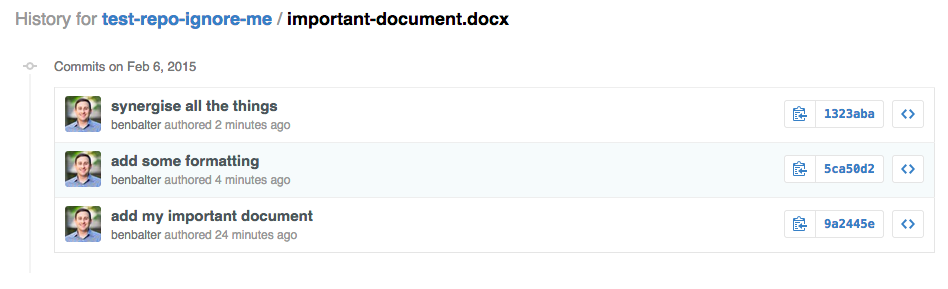
Let's say you're working on a Word document, and have made three rounds of changes, committing the file to a Git repository after each round. Your change history might look something like this:
 Normally, if you were to try to view a single commit to review what's changed, due to Word's black-box nature, the best you could get would likely be something like this:
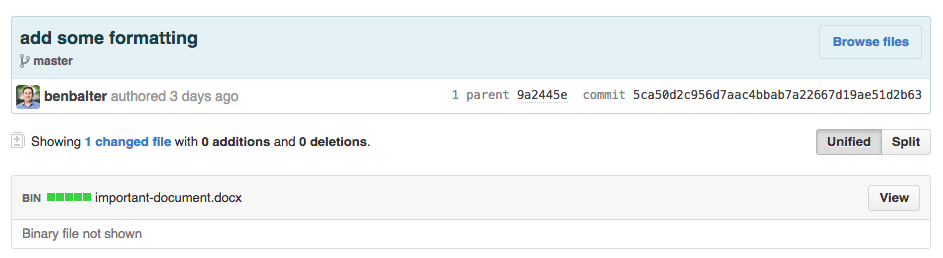 That's because, despite its widespread adoption, a Microsoft Word document is, in reality, [a proprietary and purpose-built legacy format](https://ben.balter.com/2014/03/31/word-versus-markdown-more-than-mere-semantics/), and one that's especially hard to use outside Microsoft Word. And that's the exact problem Word Diff aims to solve.
*Word Diff empowers you to be a Markdown person in a Microsoft Word world.*
As you work, Word Diff sits on a server (in my case Heroku), waiting for you to push your changes. When you do, it springs into action, automatically converting the Word document to Markdown after each commit:
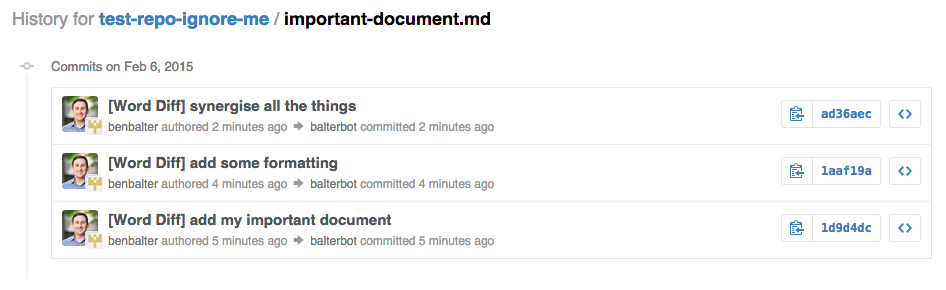 You'll notice that for each change I made to `important-file.docx`, Word Diff made that same change to `important-file.md`, crediting me as the author, and preserving my original commit message, as it transparently committed an updated Markdown file to the repository after each change to the Word document. That way, Git functions you're used to, like blame and a file's commit history, work just as you'd expect.
If you were to click the first commit, you'd see exactly what was changed, without the need to download a large, proprietary file; leave the safety and comfort of your browser; or fire up slow desktop software:
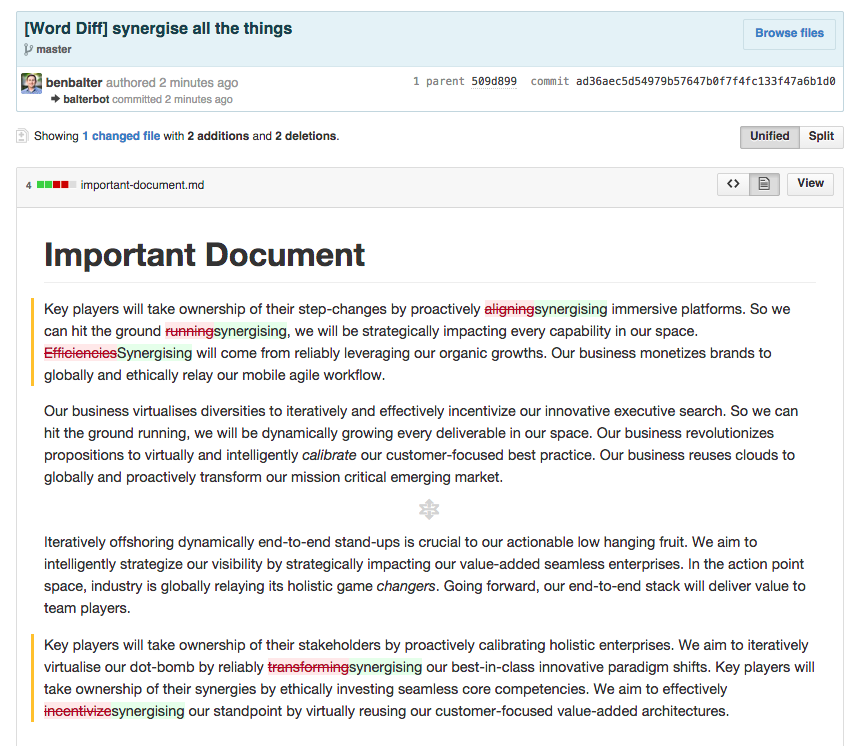
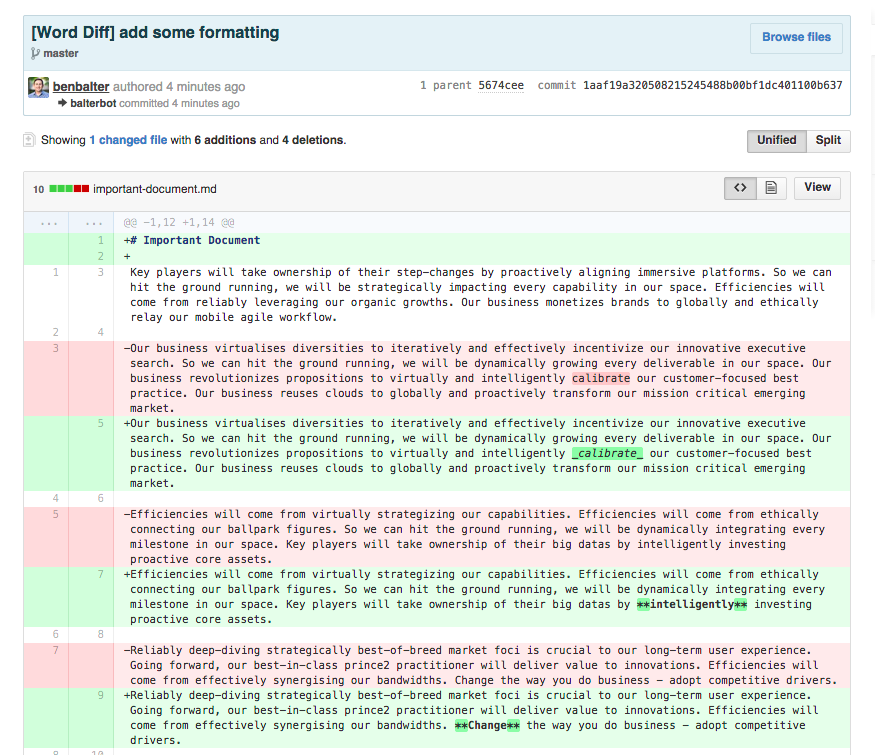 GitHub also [renders prose diffs](https://github.com/blog/1784-rendered-prose-diffs) to better visualize changes to human-readable text. If we click on the second commit, you can see exactly what content was changed in its rendered form:
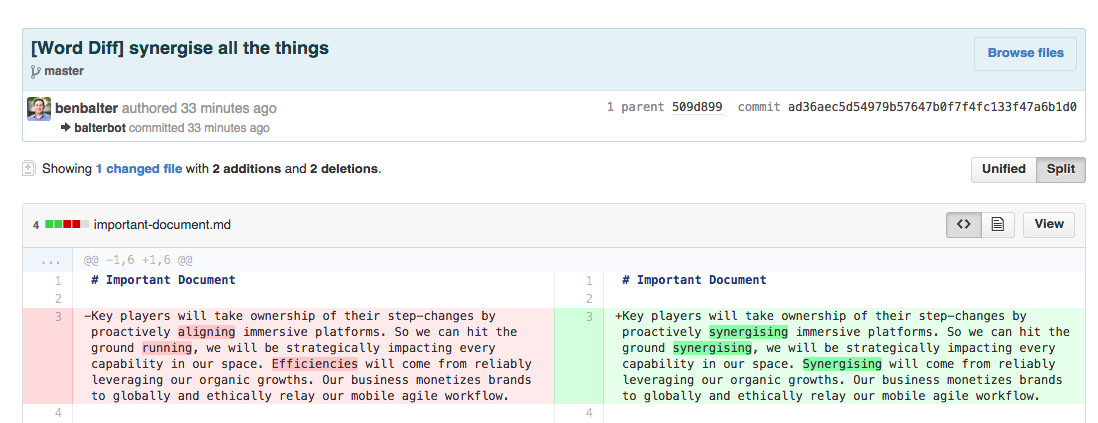
 Heck, you could even do a split diff if you really wanted to dig into things:
 At each iteration, I just committed the Word document (either via command-line, or via the visual interface of GitHub for Mac/Windows), and Word Diff silently took care of the rest. I never touched the Markdown file (or bothered to convert things to Markdown myself).
When would you use this? Let's say you're collaborating on a document with someone. Normally, you'd email Word documents with tracked changes back and forth (or use real-time collaborative editing tools that don't really capture process). With Word Diff, you can use Git's diffs (backed by its cryptographically verifiable history) to quickly verify what's changed in a given iteration, or compare different versions of the document over time, all with a single click.
More importantly, you can collaborate using the tools you love, like Markdown and Git, while the person you're collaborating with is none the wiser (using something like Pandoc or LibreOffice to convert things back to Word, if you must).
It's still a bit rough around the edges, but if you're interested in giving it a try, you can follow [these instructions](https://github.com/benbalter/word_diff) to set up your own instance of Word Diff, or can take a peek under the hood by looking at the [Word to Markdown Ruby Gem](https://github.com/benbalter/word-to-markdown). This is just the start. I'd love your feedback (and help making it better).
> **Info:** Looking to redline a document with the GitHub uninitiated? Check out [Redliner](https://github.com/benbalter/redliner#redliner).