
My biggest gripe with WordPress, the open-source content management system that silently works behind the scenes to power more than 13% of the internet, is that it sets far too high a bar with which other applications must compete. I cannot count the number of times that I have used a proprietary or commercial system and silently thought to myself, “WordPress can do this so much better*.” 1
This ritual saw no deviation, when I sat down to setup SharePoint in support of my law journal’s upcoming publication workflow. Like Alice stumbling down the rabbit hole, it quickly became apparent that in the counterintuitive world of Sharepoint, each step was going to be more and more alien than the last. And then it dawned on me: a corollary of Uncle Ben’s law, with great power does not have to come great complexity.
WordPress does many things right. It is an incredibly versatile tool, but like a body builder with a heart of gold, it is as friendly and approachable as it is powerful. WordPress has more than eight years of rock-solid experience storing, organizing, sorting, and searching all sorts of user-generated content. Its got a set of slick attachment functions to allow users to safely and securely upload and store their non-WordPress files in WordPress. For the past three years, it even has a proto-version control system in the form of its much-envied post revisions. 2 And it does all this through an interface so dumb-simple that even your grandparents could start their own site. It seems like a no-brainer then, to marry these tools to create a WordPress-based document management system.
Imagine a workflow management and version control system building on WordPress’s existing core competencies. By treating documents as a custom post type, users can leverage the power of WordPress’s extensive attachment, revision, taxonomy, and URL rewriting functionalities. Document permalinks can be routed through the traditional rewrite structure such that the latest revision of a file always remains at a static, authenticated URL, and users can toggle the visibility of documents (both internally and externally) as they currently do with post statuses and permissions. Similarly, file locking can extend WordPress’s autosave functionality (as a ping), revision logs can extend WordPress’s existing revision relationship and can be outputted as a traditional RSS feed, and so on
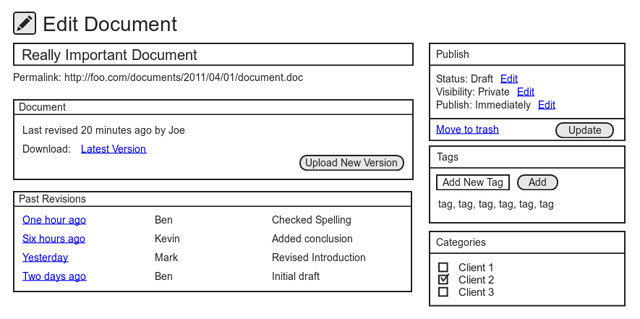
As seen in the above wireframe, document revisions would be inextricably linked to the essential WordPress experience. If you know WordPress, you know document revisions. Why reinvent the wheel when you have the best wheel the world has ever seen, and a passionate global community dedicated to improving it? This approach would not simply be limited to traditional documents. Images, PDFs, code — anything the user wants to collaborate with others on, or have a secure revision history can be thrown at it. Academics, lawyers, government folks, the possibilities are endless.
To be fair, WordPress has been arguably overextended in some cases, 3 but I do not believe that to be the case here. Sure any WordPress enthusiast may be guilty of the bolt-cutter mentality every now and then, but I believe, if anything, it is enterprise stakeholders’ tendency to gravitate toward bloated, commercial systems that is more akin to Wolf Blitzer’s boat house, and a big reason why is because with the exception of an unnamed 4 content management system’s poorly executed attempt at document management, no open-source alternatives exist.
I am working on submitting this idea as a proposed Google Summer of Code project, 5 with the goal of giving WordPress parity with commercial and proprietary applications and hopefully injecting some open-source goodness into government and other enterprise environments, but before I do, I would love to hear your thoughts. Get in touch, or leave a comment below.
Update (8/29): The final result of the project is an Open Source Document Management and Version Control System for WordPress. An overview of its top-level features including a screencast of a typical use case is available on the WP Document Revisions page.
Footnotes
See, for example, Documentum, Liferay, Melange, and Gawker’s CMS. ↩
Nearly three years ago, at the time of the feature’s inception, WordPress founder Matt Mullenweg noted, “With the power of modern computers, it’s silly that we still use save and editing metaphors from the time when the most common method of storage was floppy disks… now we’re taking that to another level by allowing you to view who made what changes when… through a super-easy interface, much like Wikipedia or a version control system.” ↩
See, for example, WordPress as an email newsletter, contact manager, CRM, invoice system, job bank, or real estate directory. ↩
Let’s just call it “Frupal” for the sake of discussion. ↩
In hindsight, I probably shouldn’t have ripped on Melange. See supra note 1. ↩